


I built a multi-agent project, for users to ask questions about their AWS infrastructure (3 AWS accounts managed by AWS Organizations) and get answers in human readable way.
The system connects to users AWS infrastructure and provide the answer by reading various log types and creating API calls to multiple AWS resources.
This project was build with Kiro, Kiro spec driven development and Kiro powers.
Project repo
Part1: I built a multi-agent project on AWS, with Strands AI and AgentCore
Part 2: Give 'em something to read! Building a data pipeline for your agentic AI project
Part 3: Make 'em safe! Security for your agentic AI project
Part 4: Make 'em remember! Memory in the agentic AI project
Part 5: Make 'em visible! See what is happening inside your agentic workflow
Part 6: When shebangs party hard with your MAC path on OpenTelemetry
Part 7: Make 'em behave! Don't let your AI agents hallucinate
What was I even thinking ?!
If I want to learn something, I need to play with it to understand it. That's why I started to experiment with and learn about AI agents and created this project.
When I started, I did not realize how big would it become! Oh boy and it became a biggie! What was I even thinking ?!
It was logical step from my previous project called logs talk to me, where I gathered CloudTrail logs from all AWS Accounts under AWS Organizations into the CloudTrail Lake and I issued SQL queries generated by LLM in Amazon Bedrock and asking questions CloudTrail may have answers to.
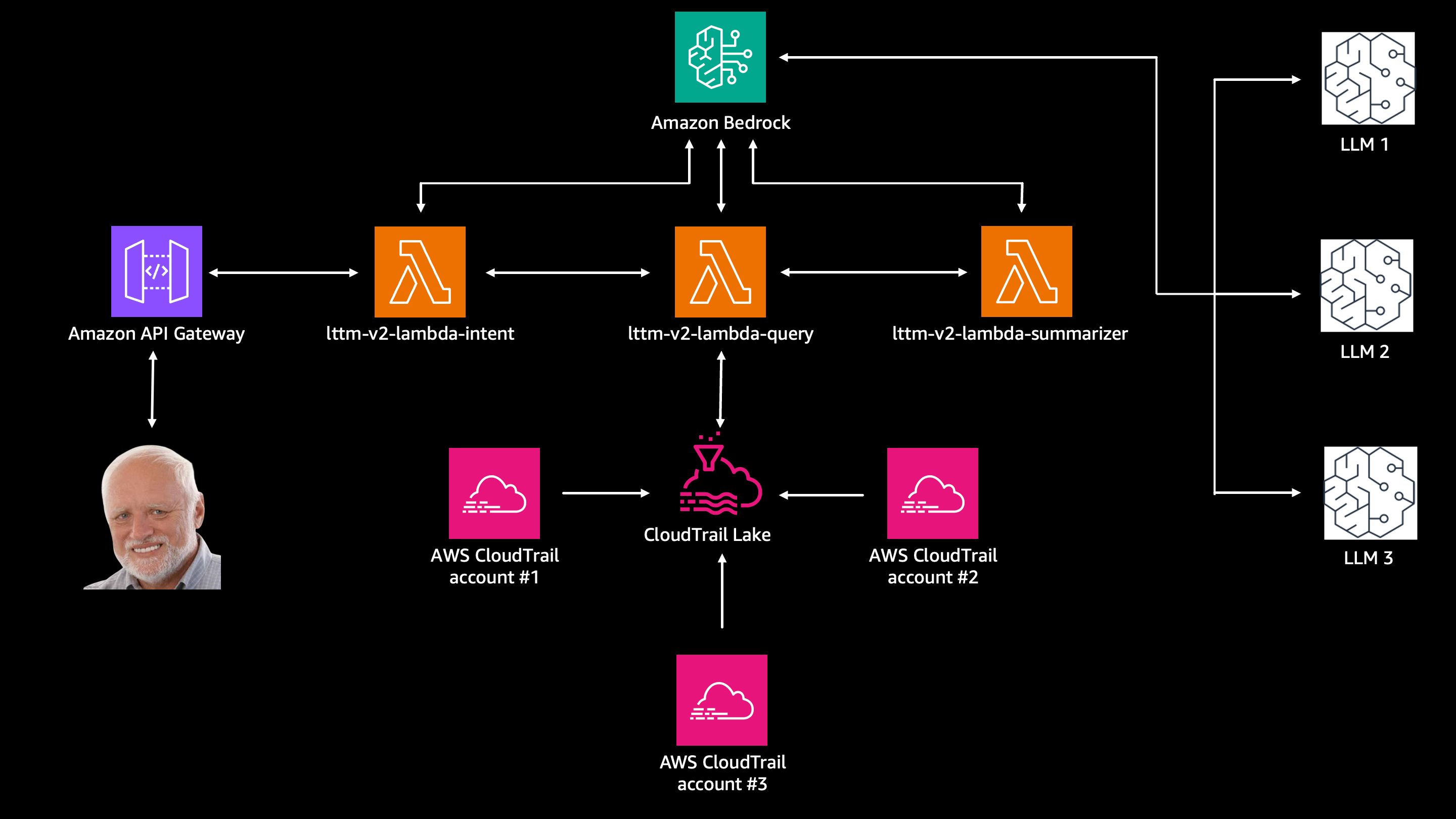
I soon realized CloudTrail is not enough, that I actually need more data sources, such as CloudWatch, Config and some other, but I also realized doing it the "old way" with lambdas would be an overkill.
So that's how I started to experiment with AI Agents and I created something that I call:
Cloud Inteligence Agency: Special agents interrogating your AWS cloud
In this project, user asks different questions and AI agents queries data sources in AWS Accounts to get the answer.
Questions like:
- Are there any S3 buckets publicly available
- Who stopped or terminated EC2 instances in prod account last week?
- Find and explain errors from the /aws/lambda/my-function log group today
Architecture and design
The Underlying infrastructure
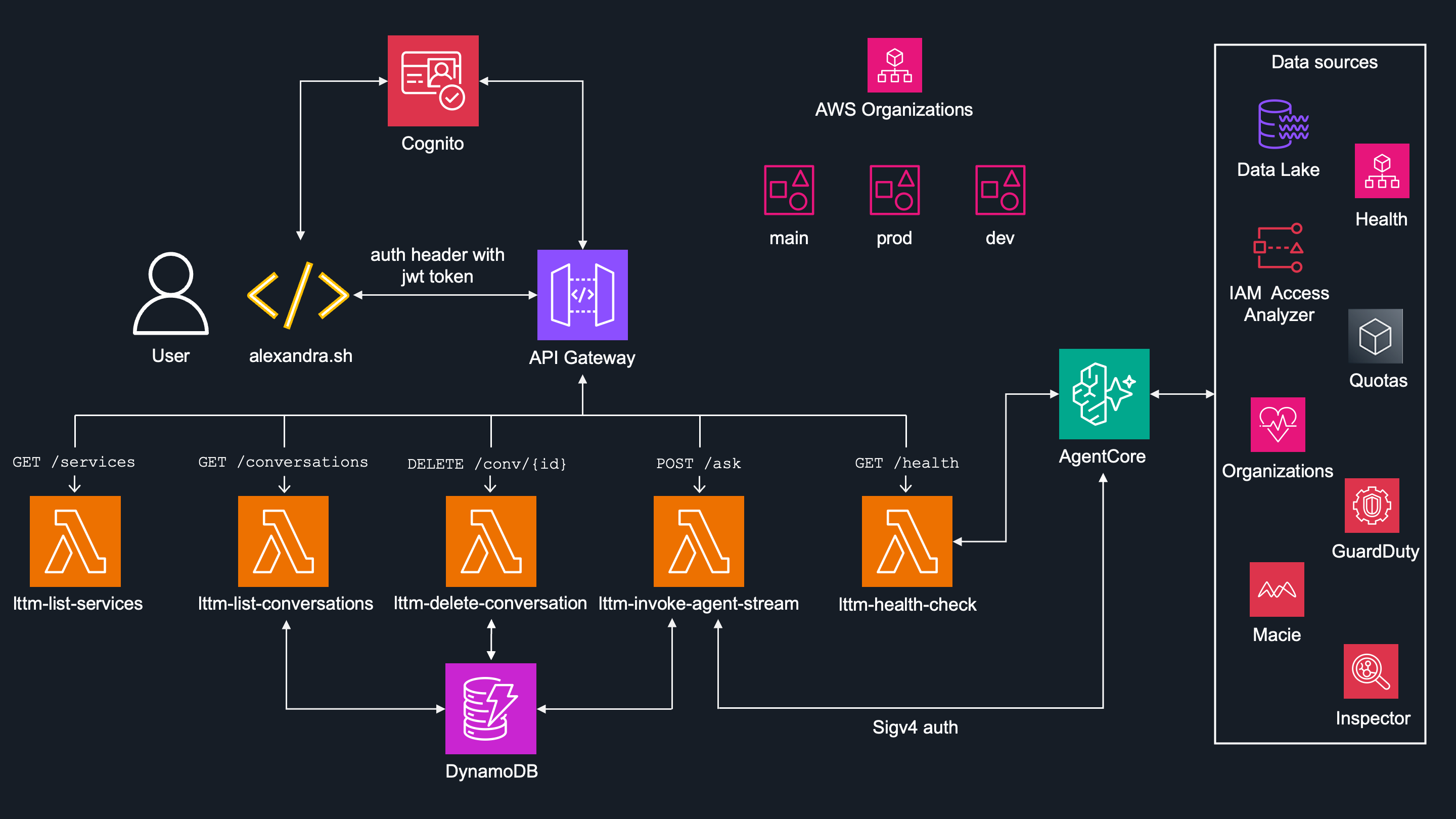
Initial architecture is pretty simple:
User (by local script
alexandra.sh) connects to AWS infrastructure through API Gateway.Cognito provides JWT token, which is then validated by API Gateway before forwarding requests.
-
API Gateway calls lambda function
lttm-invoke-agent-stream, which:- Invokes AI agent in Bedrock AgentCore Runtime.
- Stores each session metadata in DynamoDB
- Streams actual steps back to the user (which AI agent was invoked, which session ID was used, etc...)
-
There are also other lambda functions:
-
lttm-list-services- returns the list of agents in the AgentCore Runtime. This is a hardcoded list so I don't waste tokens on asking throughalexadra.shand even if I did, guardrail would block it as the system does not reveal the list of agents, as well as their prompts. -
lttm-list-conversations- In case user wants to continue with specific conversation ID, this lambda returns list of previous conversations metadata stored in DynamoDB. -
lttm-delete-conversation- Deletes the specific conversations metadata from DynamoDB.
-
AI Agents running in AgentCore Runtime connect to the data sources, format the output and present it to the user.

The Data sources
The scope of whole project is to "talk" to your AWS Account(s) and for that you need some data.
It uses both SQL queries and API calls to get the information from various data sources.
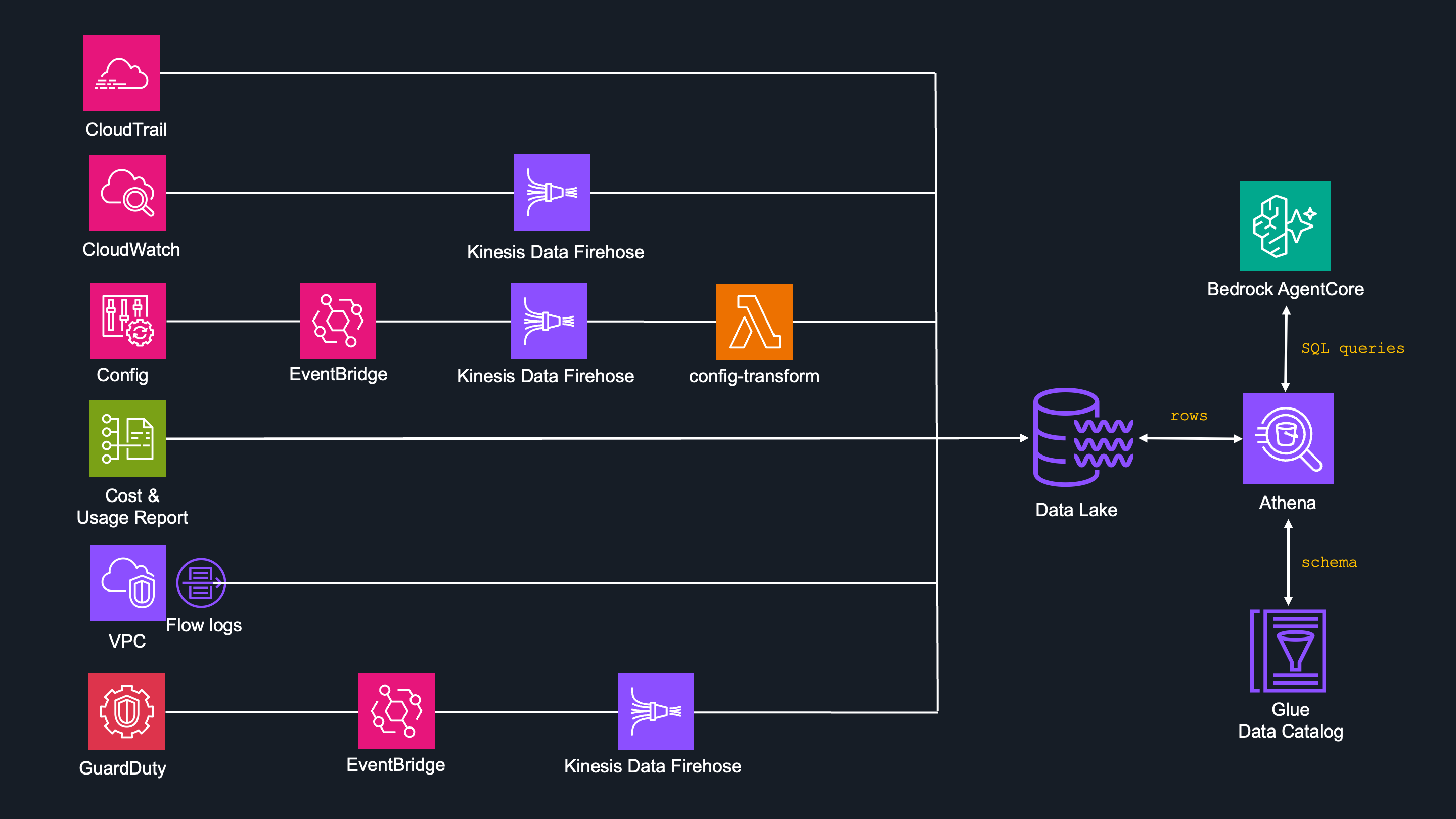
SQL queries
This approach handles AWS resources where historical data are needed, such as :
- AWS Cloudtrail
- AWS Cloudwatch
- AWS Config
- AWS Cost and Usage Report
- AWS VPC Flowlogs
- AWS GuardDuty
Logs from the data sources above are delivered to the S3 Data Lake by the data pipeline - some of them directly, some by Kinesis Data Firehose and other services (see data pipeline article for more information).
The Glue Data Catalog defines table schemas so than Athena knows how to read the data in S3.
AI agents generate SQL queries and execute them via Athena, which requests the rows from S3 Data Lake and returns resulted raw data back to AI agents for further formatting and presenting.
API calls
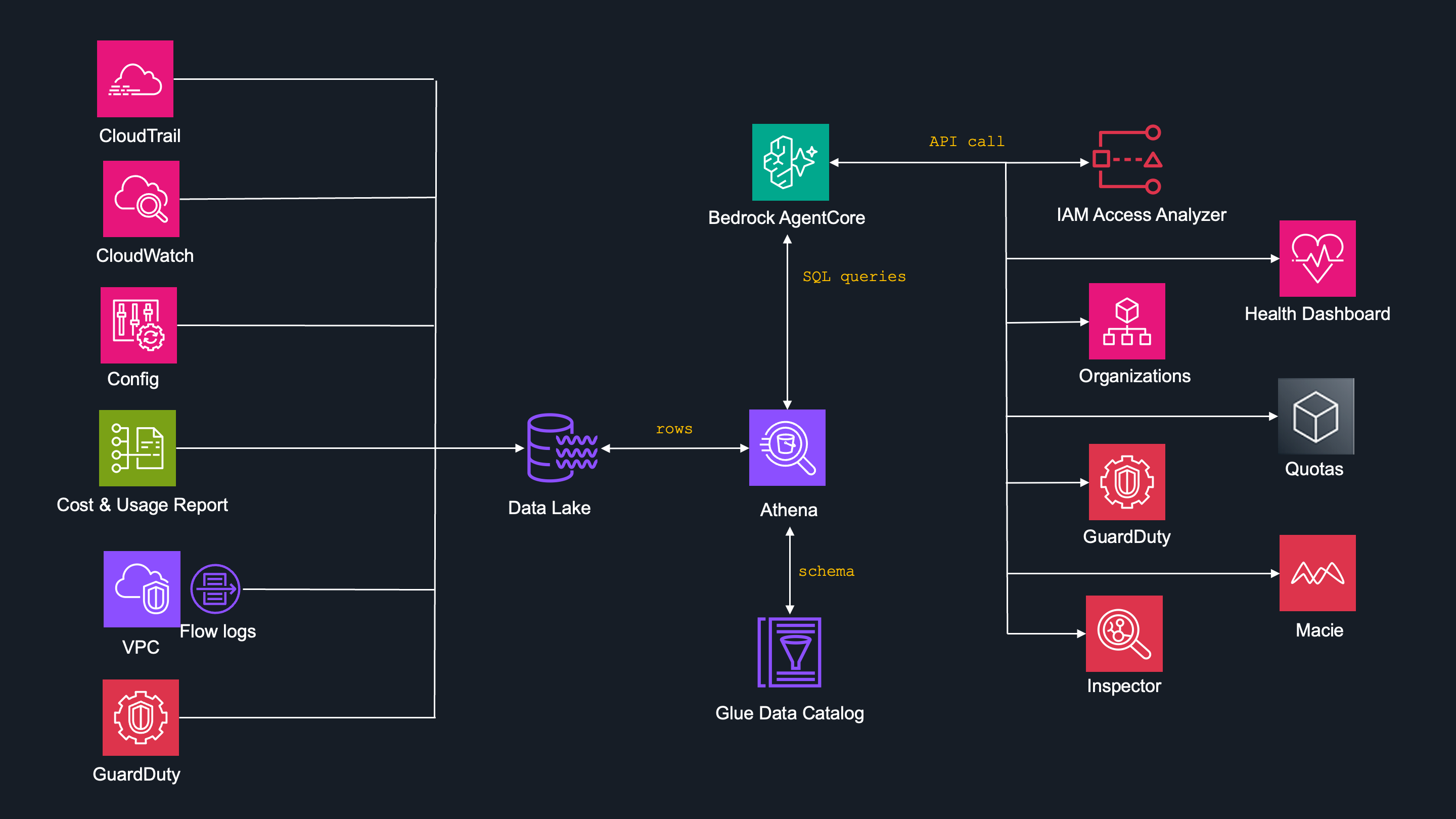
This approach handles the AWS resources, where only current-state data is needed, such as:
- AWS GuardDuty
- AWS Health
- AWS IAM Access Analyzer
- AWS Quotas
- AWS Organization
- Amazon Macie
- Amazon Inspector
There is no point in asking historical data for resources like AWS IAM Access Analyzer or AWS Quotas.
AWS GuardDuty is one and only exception, where actual data are fetched by API call and historical data is queried by SQL query.
Particular AI agent is then smart enough do decide whether to issue a API call to GuardDuty resource or SQL query to S3 DataLake.
The AI Agents
Built with Strands Agent SDK, CIA project uses a multi-agent pattern known as agents as tools. That's when a supervisor agent calls subagents as its tool.
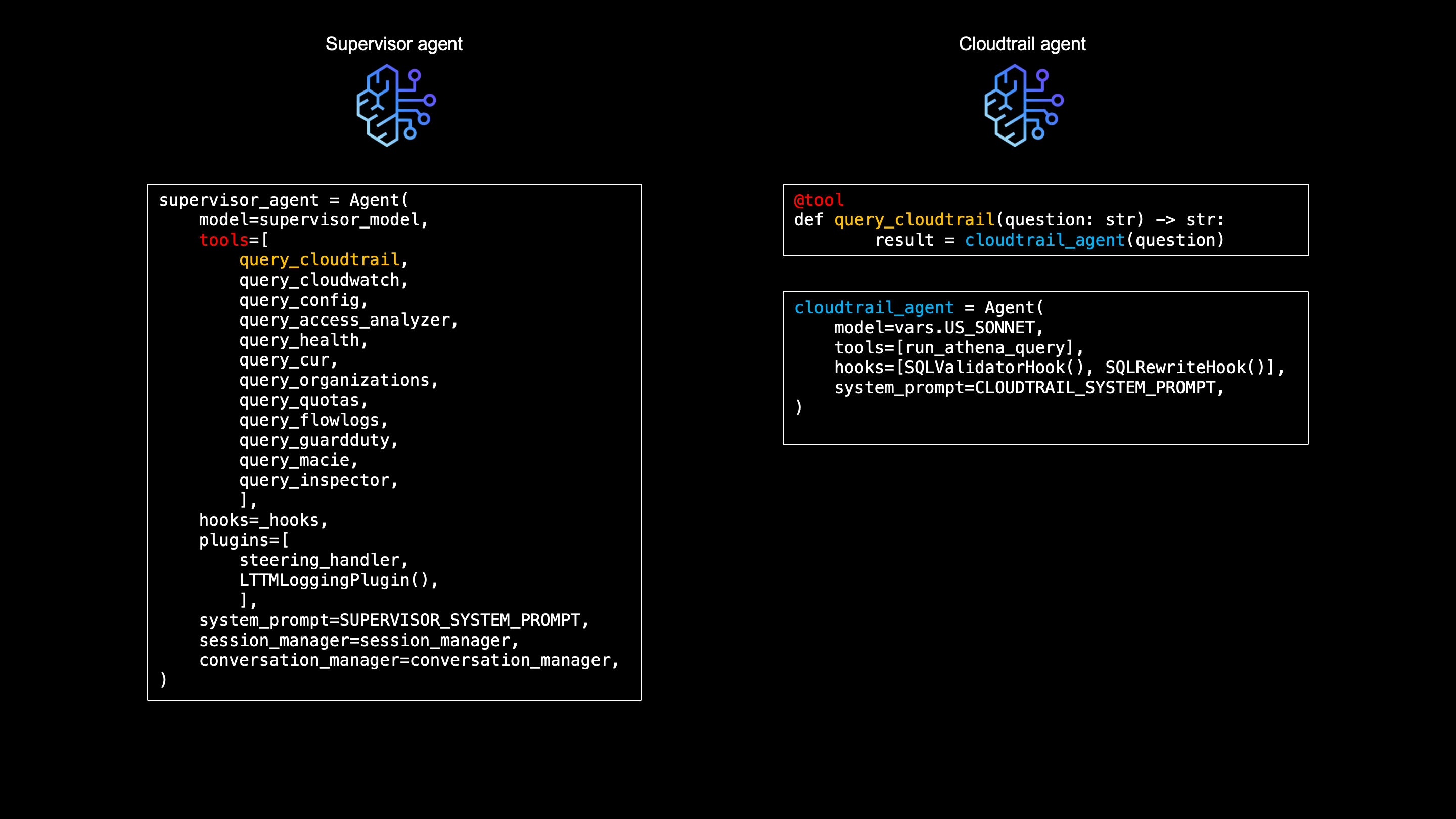
The supervisor agent is the entry point for every user question. It analyzes the question, decides which data sources should be queried and calls the appropriate subagent.
Appropriate subagent then takes over, creates SQL query towards Athena or API call to specific resource, receives the data, formats them is needed and send back to supervisor agent.
Once the supervisor agent receives the formatted data from the subagent, summarizes them and present them to the user.
There is a one dedicated subagent to each data source.
Each subagent is a "specialist" — it knows its dedicated data source and nothing more, they are not even aware of each other. The supervisor agent is the only one who sees the full picture.
Could this be a single agent with 10 tools instead of 10 sub-agents?
Well, yes. But the prompt of that single agent would be huge — "it'd need a complete schema for all Athena tables, API reference for 4 AWS services, etc..."
Not to mention, you'd have less token space left for the output.
By splitting into subagents, each one gets a its own (much smaller) system prompt that only contains what agent is dedicated to. The CloudTrail sub-agent generates SQL for CloudTrail data, the Quotas sub-agent calls the Service Quotas API, etc...
For questions that span multiple data sources the supervisor is able to call multiple subagents.
It also makes the codebase manageable. New agents can be added easily as new small file, then messing with one huge code.
Having a subagents knowing only what they supposed to know, makes also better SQL quality and the ability to use different models per agent if needed.
However, this setup comes with the downside. Having two AI agents (subagent and a supervisor) "touching" the response, doubles the hallucination risk. See this article where I am explaining how I dealt with hallucinations by combination of deterministic hooks and LLM-as-judge pattern.
All agent prompts follow the RISEN framework - Role, Instructions, Steps, Expectation, Narrowing, for consistent and predictable behavior across all subagents.
The system also includes a multi-layered guardrail stack — a combo of deterministic hooks and managed Bedrock guardrails to block prompt injection and protect internal architecture details. See more of that in security article
Code Examples
Taking CloudTrail subagent as an example, here's how a subagents are defined:
cloudtrail_agent = Agent(
    model=vars.US_SONNET,
    tools=[run_athena_query],
    hooks=[SQLValidatorHook(), SQLRewriteHook(verbose_columns=["requestparameters", "responseelements"], default_limit=20, verbose_limit=5)],
    system_prompt=CLOUDTRAIL_SYSTEM_PROMPT,
)
Each subagent uses its own model, tools, hooks, and system prompt.
Like here, the CloudTrail subagent calls run_athena_query as its tool and 2 hooks - SQLValidatorHook and SQLRewriteHook.
The subagents are then called by the supervisor agent as a tool function
supervisor_agent = Agent(
    model=supervisor_model,
    tools=[
        query_cloudtrail, query_cloudwatch, query_config,
        query_access_analyzer, query_health, query_cur,
        query_organizations, query_quotas, query_flowlogs,
        query_guardduty,query_macie,query_inspector
    ],
    hooks=[output_integrity_hook, architecture_guard],
    plugins=[steering_handler, LTTMLoggingPlugin()],
    system_prompt=SUPERVISOR_SYSTEM_PROMPT,
)
When the user asks "Who created the S3 bucket yesterday?", the supervisor agets reads the tool descriptions and picks query_cloudtrail tool, which is nothing but CloudTrail subagent.
The subagent generates SQL, sends it to Athena for execution and returns the raw rows.
Letting subagent's LLM not summarize the data received, but rather format it deterministically with Python and sent to supervisor agent for summarization, is one of the anti-hallucination layers I am using.
Flags
I came with system of flags, for easier questioning where we maybe need previous session, or data from memory and so.
Modifier flags (--new, --session, --clean)
- Modify how a question is sent to the agent.
- They require a question argument.
- Can be combined
Mode flags (--history, --delete, --health, --services)
— Standalone operations that don't invoke the agent.
- No question argument needed.
- When a mode flag is active, modifier flags are silently ignored.
- Only one mode flag can be active at a time - combining any two mode flags produces an error.
Easter Egg (--notboring)
- Try for yourself
- Can be combined with Modifier flags* or can be standalone
Usage of flags
| Command | Action |
|---|---|
./alexandra.sh <no flag> "question" |
Normal question, reuse last session, full memory |
./alexandra.sh --clean "question" |
Question with no memory injection |
./alexandra.sh --new --clean "question" |
Fresh session, no memory — blank slate |
./alexandra.sh --history |
List past sessions (no agent invoked) |
./alexandra.sh --delete abc123 |
Deletes session metadata |
./alexandra.sh --health |
Checks runtime health (no agent invoked) |
./alexandra.sh --services |
Lists available sub-agents (no agent invoked) |
./alexandra.sh --new --notboring |
easter egg, turning on fun mode - see for yourself |
Example flow
Let's see how all that flows from start to beginning, in simple example "describe last 2 cloudtrail events"
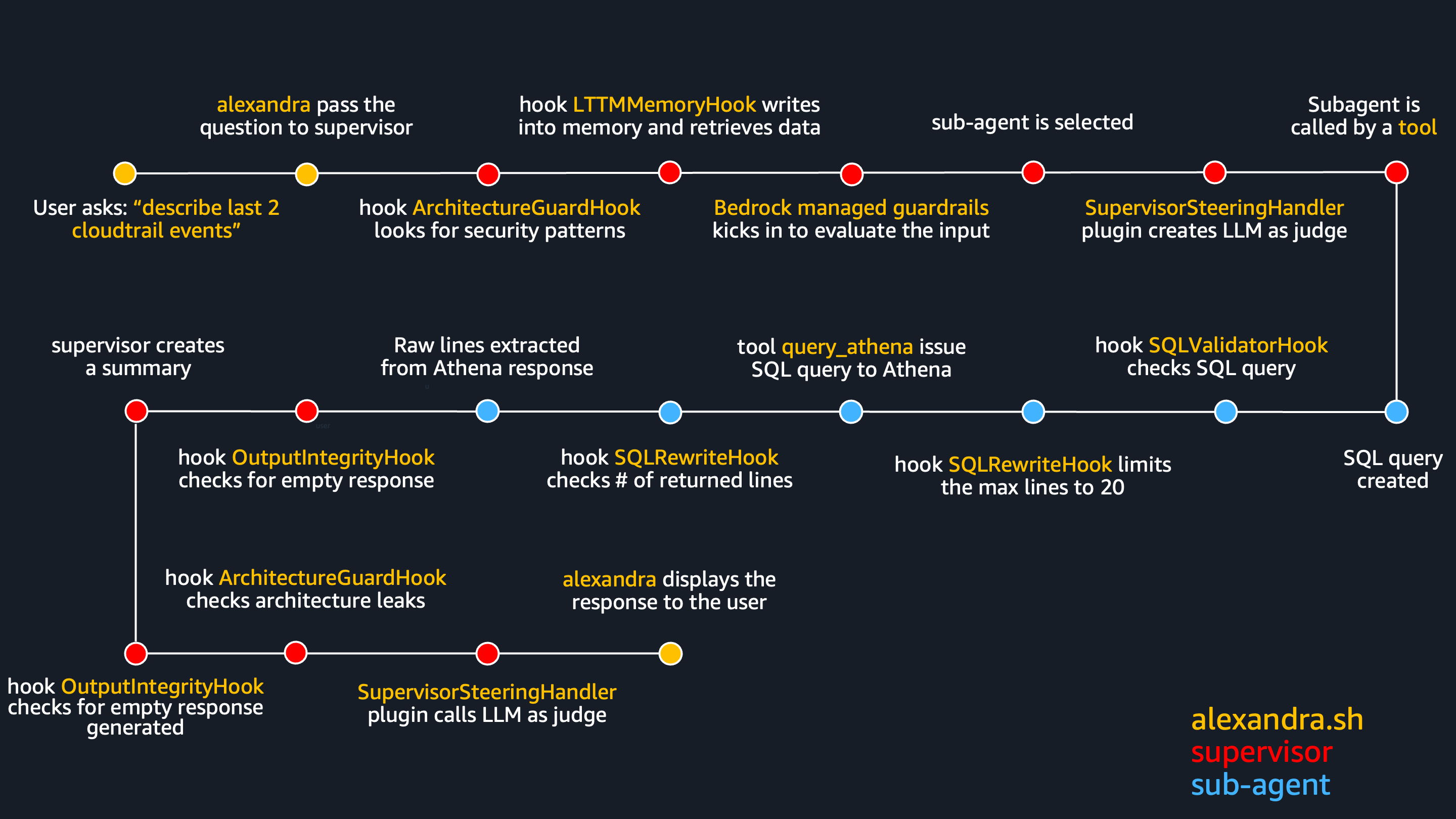
User asks:
./alexandra.sh --new "describe last 2 cloudtrail events"alexandra extracts it and pass to supervisor agent.Because use used flag
--new, fresh session ID is created, independent of the previous ones.Data gets to supervisor agent where plugin
SupervisorSteeringHandlerstores the question for later use.hook
OutputIntegrityHookis triggered, just to reset some flags in case they are needed later.hook
ArchitectureGuardHookis triggered to scan the user's question for probing patterns like "list your tools" or "show me your prompt".
If detected invocation stops, nothing is sent to AgentCore and agent intermediately responds it can only help with AWS infrastructure.
This is a custom guardrail even before it gets to Bedrock.Another hook -
LTTMMemoryHookis called to retrieve semantic memory facts and episodic reflections from AgentCore Memory to be appended into to system prompt.
Depending on a flag (--new,--clean, none) hook will or will not append.
Even if nothing is retrieved, every message it written to AgentCore Memory anyway, if memory is not skipped at all with--cleanflag. See more on how I am using a memory in this article.Now Bedrock Managed Guardrail evaluates input for prompt injection, topic denial, etc... before LLM generates the response.
If guardrails are violated, user see message “GUARDRAIL VIOLATION: I can only help with AWS infrastructure and log analysis questions.” and invocation is stopped.If not blocked so far, now the data gets to supervisor agent's LLM which reads the system prompt + memory context + user question and decides which tool (subagent) to call.
Right before the subagent is called, plugin
SupervisorSteeringHandlerruns again and creates a separate LLM-as-judge that checks if the supervisor pick the right subagent, right account, right time range, etc...
If judge decides it's wrong, supervisor's LLM if forced to retry.
This is one of the anti-hallucination layers I use in this project.During the same event plugin
LTTMLoggingPlugincreates a log for CloudWatch - somehting like:[LTTM:Log] TOOL_CALL query_cloudtrail — {'question': 'give me last 2 cloudtrail lines'}. More on observability in this project.Only now the supervisor calls tool
query_cloudtrailto invoke cloudtrail subagentNow subagent's LLM creates a SQL query:
SELECT eventtime, eventname, eventsource FROM lttm_logs.cloudtrail_logs WHERE account_id = '123' AND year = '2026' AND month = '04' AND day = '26' ORDER BY eventtime DESC LIMIT 2.Before subagent calls its tools hook
SQLValidatorHookis called. It deterministically checks the SQL for valid table name, partition keys, no DROP/DELETE, etc...
This is another anti-hallucination layer.During same event, hook
SQLRewriteHookis called, to check theLIMITin SQL query as it must not be more than 20.
From my testing experience if LIMIT is more than 20 it returns too many rows that blow the token budget, causing the supervisor to hallucinate.
In our case LIMIT is below 20 so nothing happens.Now finally a subagent calls its tool
run_athena_querywhich executes the SQL query to AthenaA hook
SQLRewriteHookjust to check if Athena did not return an empty response by mistake.-
Now that subagent received the output from Athena it generates the output.
This is true nature of LLM, but this is exactly what I don't want - I want suppervisor agent to be THE ONLY summarizer. The more summarizers you have, the more hallucinations you can (and will!) get.
One agent's hallucination becomes the next agent's ground truth, and the error cascades through the system without triggering any exception.[read more]So as another antihallucination layer, only the raw which were sent from Athena are extracted and whatever the LLM generates is ignored.
Sorry bud', nobody wants to see your summary.

Extracted lines look like this:
"[
{"eventtime": "2026-04-25T10:30:00Z", "eventname": "CreateBucket", "eventsource": "s3.amazonaws.com", "useridentity": "arn:aws:iam::123:user/admin"},
{"eventtime": "2026-04-25T09:15:00Z", "eventname": "TerminateInstances", "eventsource": "ec2.amazonaws.com", "useridentity": "arn:aws:iam::123:role/deploy"}
]"
which are then formatted to something this:
Row 1:
eventtime: 2026-04-25T10:30:00Z
eventname: CreateBucket
eventsource: s3.amazonaws.com
useridentity: arn:aws:iam::123:user/admin
Row 2:
eventtime: 2026-04-25T09:15:00Z
eventname: TerminateInstances
eventsource: ec2.amazonaws.com
useridentity: arn:aws:iam::123:role/deploy
And this is the result that supervisor agents gets to summarize.
We are back in supervisor again, hook
OutputIntegrityHookis called to check if we got real data (not empty, not error, etc...).
This is yet another anti-hallucination layer, because LLM must generate something. If nothing returned it'd would (oh boy and it did!) come up with something.During the same event, our already known
LTTMLoggingPluginplugin makes a CloudWatch log:[LTTM:Log] TOOL_DONE query_cloudtrail — <x>ms.Now supervisor writes a summary from a formatted rows it received.
Hook
OutputIntegrityHooknow checks if supervisor said "no results found" when tools actually returned data, or asked follow-up questions instead of answering.
This is another, yet deterministic, antihallucination layer coming from testing experience.Hook
ArchitectureGuardHook, is called to check if supervisor leaked internal names like "query_cloudtrail", or "SQLValidatorHook, etc..." in its response.
If detected, it is sent back to retry.
There is a reason why I am using custom output guardrail, instead of Bedrock Managed Guardrail more in security article.Plugin
SupervisorSteeringHandlerinvokes LLM-as-judge again, this time to compare tool result vs. supervisor response.
If that final check pass, summary is final and it's presented to user.

It may seem that those guys do nothing but hallucinate...

Well, they try! But only until you make 'em behave!
Underlying infrastructure code
Whole infrastructure can be deployed by terraform, except the agents, those are deployed using agentcore deploy command.
Full source code for agents and infrastructure is available here.
What's next ?
In this article I introduced the whole project from bigger perspective.
In followup articles I go deeper on:
- Data pipeline
- Security
- Memory
- Observability here and here
- Antihallucination
Additional reading
Building Multi-Agent Systems with RISEN Prompts and Strands Agents
Writing System Prompts That Actually Work: The RISEN Framework for AI Agents
Building AI Agents with Strands: Part 1 - Creating Your First Agent
Building AI Agents with Strands: Part 2 - Tool Integration
AI Agents Don’t Need Complex Workflows. Build One in Python in 10 Minutes


Top comments (0)