


Deploying a Python Flask app with Docker sounds straightforward… until it isn’t. 😅 Recently, I rolled up my sleeves to containerize and deploy a simple Flask app connected to PostgreSQL. While it seemed like a walk in the cloud, I ran into several walls—but breaking through them made the win even sweeter. Here’s how it all went down 👇
🏗️ Project Setup
I started with a basic Flask app that connects to a PostgreSQL database. My directory looked like this:
📁 python-docker-project/
├── Dockerfile
├── compose.yml
├── app.py
├── requirements.txt
└── README.md
My app.py had two routes:
-
/: returns a simple greeting -
/db: connects to PostgreSQL and returns the DB version
The goal? Run this app in a Docker container and use Docker Compose to spin up both the app and a PostgreSQL service in one command.
🐳 Dockerfile Setup
I created a simple Dockerfile:
FROM python:3.11-slim

WORKDIR /app

COPY requirements.txt .
RUN pip install -r requirements.txt

COPY . .

CMD ["python", "app.py"]
Looks good, right? 🤓 But here’s where the trouble started…
💥 The First Crash: Dependency Drama
When I ran:
docker compose -f compose.yml up --build
Boom 💣
ERROR: Could not find a version that satisfies the requirement click==8.2.0
Hmm. Turns out the click==8.2.0 version in requirements.txt requires Python >= 3.10, but I was using python:3.9-slim-buster as my base image.
🔧 Fix:
I upgraded the base image in my Dockerfile to:
FROM python:3.11-slim
Problem solved. ✅
🧊 The Second Freeze: Compose Conundrum
Feeling confident, I re-ran the build and... 💥 another error:
KeyError: 'ContainerConfig'
At this point, I’m like, “What even is ContainerConfig?” 😤
🕵️♂️ Root Cause:
I was using Docker Compose v1.29.2 (legacy), which doesn't play nice with newer images or Docker Engine versions.
🔧 Fix:
I upgraded to Docker Compose v2 using:
mkdir -p ~/.docker/cli-plugins/
curl -SL https://github.com/docker/compose/releases/latest/download/docker-compose-linux-x86_64 \
  -o ~/.docker/cli-plugins/docker-compose
chmod +x ~/.docker/cli-plugins/docker-compose
And voilà! docker compose up started working without the dreaded ContainerConfig error. 🎉
🟢 Final Compose File
Here’s a sneak peek at my compose.yml:
version: '3.8'

services:
  app:
    build: .
    ports:
      - "5000:5000"
    environment:
      - DATABASE_URL=postgresql://postgres:mysecretpassword@db:5432/mydatabase
    depends_on:
      - db

  db:
    image: postgres:13
    environment:
      POSTGRES_USER: postgres
      POSTGRES_PASSWORD: mysecretpassword
      POSTGRES_DB: mydatabase
    volumes:
      - db-data:/var/lib/postgresql/data

volumes:
  db-data:
🎯 The Sweet Success
After all the bumps, running the final command:
docker compose up --build
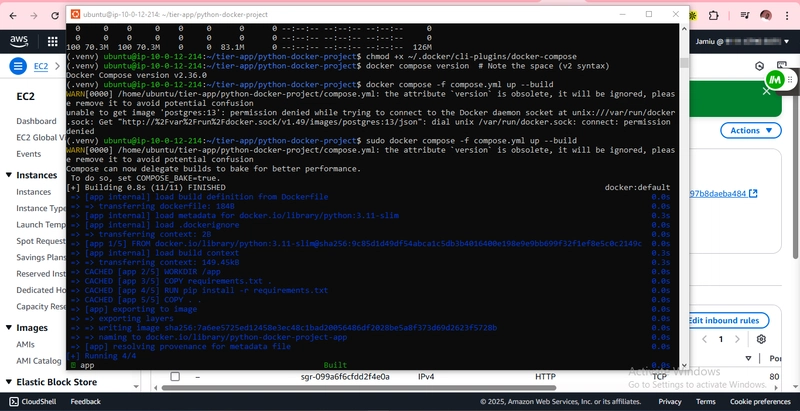
…worked flawlessly. I visited:

-
http://localhost:5000/→ Hello from Flask ✅
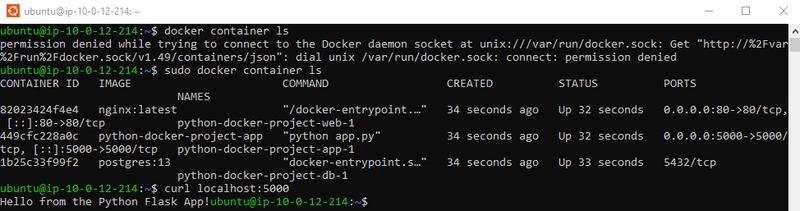
-
http://localhost:5000/db→ PostgreSQL version info ✅
💡 Key Takeaways
- 🐍 Match your Python version with compatible libraries (watch those
requirements.txtentries) - 🐳 Use Docker Compose v2 for smoother experience with modern images
- 🧠 Don’t panic when you hit errors—each one teaches you something
- 🔧 Always check if errors are due to version mismatches, especially with Docker
🏁 Final Words
This small project taught me that deployment isn't always plug-and-play—but that's what makes it rewarding. If you're running into Docker or Python-related issues, you're not alone. Just breathe, dig deep, and Google like a ninja. 💻
Want more stories like this or need help with your own cloud projects? Follow me at CloudWithHorla ☁️💪


Top comments (0)