
If you are like me you also like changing your theme and font of VSCode frequently. I also love to find new themes and fonts. Here is mine.
/...

For further actions, you may consider blocking this person and/or reporting abuse


hi res screenshot
Theme: Karma
Font: Dank Mono
Game changer to have the side bar on the right :o
What’s the benefit though? I’ve tried a few times but keep going back to having it on the left. It feels weird to have the code indent all the way to left of the screen.
the benefit is noticed if you're using Ctrl+B very often .. the code would be indented every time if you have the side bar on the left.
And until Microsoft added the option to switch the control bar to the right, the code always looked like 💩 until you formatted it when you were ready to push to GitHub. I remember very well 🙄
It all comes down to your preference. To me it just looks less cluttered on the left side.
Theme: 1984 - Light
Font: Dank Mono
Extensions: Alphabetical Sorter, Bracket Pair Colorizer, Git Blame, PHP Intelephense, Prettier, Snippet Creator, TODO Highlight
You use light theme?
Yep! It feels better on my eyes.
Try horizon
Dark themes are better for the night times or cloudy weather. Used in a very bright atmosphere (like in an office with neons) they don't make a lot of sense and could hurt your eyes.
I switch between light and dark themes many times a day. There are even extensions to toggle them automatically (not a VSCode thing: the Opera browser does this natively).
Nice to see a good light theme, I find them much easier on the eye.
Cool 🔥
Here's mine
Theme: BeardedTheme Monokai Metallian
Extensions: Color Highlight, Bracket Pair Colorizer.
This is looking amazing bruh ! ;)
best of all to me, thanks man 😎
🤟🤟
Thanks for the cap.
Thanks for the color highlight extension. I never used it before. But i knew that i need this functionality 😜
this is how my current IDE setup look likes
Woah !! that's dope. What's the theme name?
theme: Deepdark Material Theme
Nice !!
Extension?
what font is that ?
Theme: Dark Lavender my theme
Font: Lilex
I want to try Lilex. What did you input in "editor.fontFamily" in settngs.json. "Lilex" is not working for me. Same with the nerdfont varient.
Here is the download page for Lilex, you need to install Lilex (either otf or ttf) then restart VSCode and add
Lilexat the very beginning ofeditor.fontFamily:"editor.fontFamily": "Lilex, ...other fonts",I can't get it to work, I have installed the font, I have put it in vs code and I have even restarted the computer and I do not get the same font, any ideas?
show your vscode settings
{
"editor.linkedEditing": true,
"tabnine.experimentalAutoImports": true,
"workbench.iconTheme": "material-icon-theme",
"workbench.productIconTheme": "fluent-icons",
"editor.renderWhitespace": "none",
"git.autofetch": true,
"git.confirmSync": false,
"window.zoomLevel": -1,
"php.validate.executablePath": "C:\php\php.exe",
"workbench.colorTheme": "Dracula",
"editor.fontLigatures": null,
"editor.fontFamily": "Lilex,Consolas, 'Courier New', monospace"
}
Theme: Lucy
Font: Fira Code
I didn't bother to look for the buttons for changing fonts and colors. The default looks fine.
Plugins:
Used to use Markdownlint too.
It is nice, but it is one of a few plugins, that shouldn't be ON be default; otherwise, you can't cooperate with others...
I have Markdownlint configuration in the repository, and CI fails the build if there's any violation. I don't see a problem here.
I made PR to people who don't have Markdownlint, too.
Plugins : Go , TSlint, Prettier, advanced-new-file
Theme: Horizon Italic
Font: Comic Mono
This is so beautyfull. The theme, the font, go, panel to the right... God
Haha thanks 😊
damn son. this is amazing
𝗧𝗵𝗲𝗺𝗲: Dark+ (default dark)
𝗙𝗼𝗻𝘁: MesloLGS NF
hi-res link
Must have extensions:
Other extensions:
"Docs View" was exactly what I needed, thanks!
Theme: Custom theme made on Themer.dev
Font: IBM Plex Mono
Extensions: materiel Icon Theme, vim, wakatime, rust, Remote WSL, Markdown Preview Enhanced, Glitch, MS-Dos Theme
Theme: Arbitor
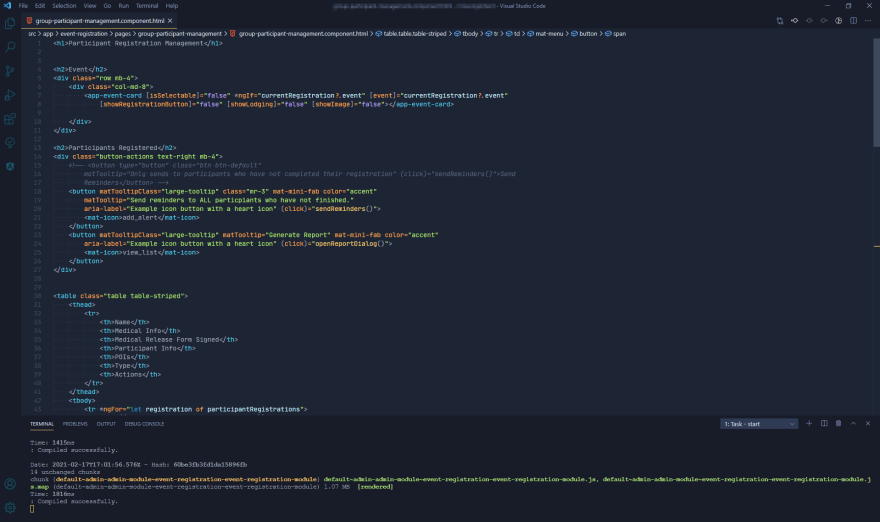
Font: Jetbrains Mono w/ font ligatures
How does it looks?
Do you not see my picture in the post?
Shit, it wasn't showing in the Notification section my bad. 😅
No worries! I was having issues myself and had to refresh my page.
But anyways, your setup looks cool. 🔥
Theme: Solarized Dark
Icon theme: Material Icon Theme
Recommended Plugins:
Relevant
settings.jsonColor theme: Monokai Pro (Filter Octagon)
Icon theme: Monokai Pro (Filter Octagon) Icons
Product icons: Fluent Icons
Font: JetBrains Mono
Theme: Gruvbox Material + Webstorm Icon Theme
Font: Pragmata Pro Mono (though I also enjoy Jetbrains Mono)
Top 3 Plugins:
Looks good 👍🏽
I like gruvbox so much
love the subtle colours
Theme: Cobalt 2 (with some customizations)
Font: Fira Code
My theme customization settings: gist.github.com/DenverCoder1/6573f...
Customisation like?
Darker background colors, more teal highlights, changed the comment color to have more contrast, etc. It's all in the settings.json I linked above.
Not very original, but;
Theme: Dracula
Font: JetBrains Mono
Two of my favourite theme related plugins I didn't see mentioned yet:
Link to gif
Theme: Kawaii
Font: Basic Consolas.
Full list of extensions
Recommended:
Does anyone use theme: Shades of purple ?
I love theme dracula too.
Shadea of purple => Yes!
My current VS Code Setup :
Theme : Mayukai Theme
Font : Iosevka Mayukai
Currently using VS Code Plugin :
That is a nice setup, here's mine:
THEME: One Dark Pro
Extensions: Insert an emoji, rfc, Beautify
Insert an emoji. Damn that’s cool.
Hi Sarthak, on Windows you can use the shortcut "windows+." to open an emoji keyboard. You can use it in every program; it's quite handy
Color Theme: Mayukai Mono
File Icon Theme: Material Icon Theme
Font: Cascadia Code
Theme: One Dark Pro
Font: Fira Code
File icon theme: Material icon theme
System Icon theme(sidebar icons): Fluent icons
I also like to switch setups, that's why I created 🦎Chameleon. It's a vscode extension that changes the theme and font when a new instance of vscode is opened. I think you're going to like it, for more info see dev.to/timdeschryver/new-vscode-ex...
dev-to-uploads.s3.amazonaws.com/up...
Theme: CyberPunk Theme(Umbra Protocol)
Font: Fira Code
Extensions: Color Bracket Pair, ES7 Snippets, Live SASS Compiler.
𝗧𝗵𝗲𝗺𝗲: Valley
𝗙𝗼𝗻𝘁: Fira Code
In Zen mode
😎👍
Can you give me the exact font name and the weight? I just downloaded the font you are using but mine looks kind of clunky and unsmooth!
Guys, for Windows 10, use the OTF format. For some reason TTF is very jagged and unclean!
You may download the font here: github.com/microsoft/cascadia-code...
Well I'm using
Cascadia Code PLTheme: GitHub Light
Font: Dank Mono
Now because everyone posted so much of their internal code base I will be able to hack every one of you.
mines don't have much but my new opensource project
mine's a joke of course :)
Damn you revealed my evil plan. 😡
Theme: Dracula 🧛🏻♂️
Font: JetBrains Mono
Icons: Material Icon Theme
I'm using the slack theme and it looks amazing
I use to have that too.
Hows that indentation is coloured?
The Indent rainbow extension
Adding to my list. 💯🚀
Theme: GitHub Dark
Font: JetBrains Mono
Extensions: Go, ReScript, ElixirLS, Error Lens, Prettier, Quote Flipper, SQLite, Tailwind CSS Intellisense, Resource Monitor, etc
Theme: Tokio Night
Extensions:
Here's mine
Theme: Aurora X
Font: Consolas
Theme: Bluloco Light
Font: Dank Mono
Extension: VSCode Vibrancy
Font - Jetbrains Mono (Current Fav 🔥 )
Theme - Community Material Theme
Extensions 🧨
Settings sync ( 🌩 cloud backup of current settings )
Colour HighLight
Auto rename tag
Bracket Pair colorizer
ES7
Liver Server
Monokai Theme
Polacode
Prettier
TabNine
I love Gruvbox.
Theme: Gruvbox (Midnight)
Icons: Material Icon Theme
Font: JetBrains Mono
Nice 👍🏼
Here's mine 🌈🙌🏻
Theme: Nightbow
Font: Fira Mono
Black VS Code theme with bright colors 🌃🌈
Tokyo Night is my favourite theme😍
Try GitHub Theme
Color theme: Nord
Icon theme: Material Icon Theme
Font: Dank mono
Theme: CodeStackR
Font: Cascadia Code
nice. How is mine?
dev-to-uploads.s3.amazonaws.com/up...
good
Theme: GitHub Dark
Font: Fira Code
Any good theme for php ?
font i always stick to fira code .
you guysz can suggest me themes & extensions specially for php
Maybe you can try Mayukai Theme and Iosevka Font.
I tried thin & it's really Awesome, Thanks man..
Theme: Dark Material Theme | Full Dark Version
Font-family: Dank mono
Font-size: 13
Why everyone uses right sidebar? Is there a benefit?
Thanks <3
You dont move your editor panel every time you toggle the sidebar. Thats why i put it to the right
That’s a neat one.
Theme Nord Native
Font JetBrain Mono with ligatures
I love this game and changing up my vs themes After Dark is my new flavor of the day!
Theme: Community Material Theme
Extensions: ES7 React/Redux/GraphQL/React-Native snippets
VS Code is going to play a pivotal role in the development of software.
Upload picture too bro.
OK !
dev-to-uploads.s3.amazonaws.com/up...
Cool
Theme: Poimandres

Font: Dank Mono